Why the new yyzTools System Optimizer treats registry cleanup as a database migration problem. Part of the 1.0.8 release notes, told from the engine room.

Windows tweaks are the dark matter of PC utility software. Every "optimize your PC" tool ships hundreds of them — disable telemetry, clean the right-click menu, kill startup delays — and they all share one property: nobody can audit hundreds of registry edits, so nobody does. You click "Fix All", cross your fingers, and hope the tool's authors were more careful than the average Regedit forum post.
We shipped a System Optimizer in 1.0.8 and gave it 331 tweaks across eight categories. The interesting part is not the number. It's the constraint we imposed on ourselves: every single change must be reversible, from a snapshot, without trusting the tool's own memory of what it did.
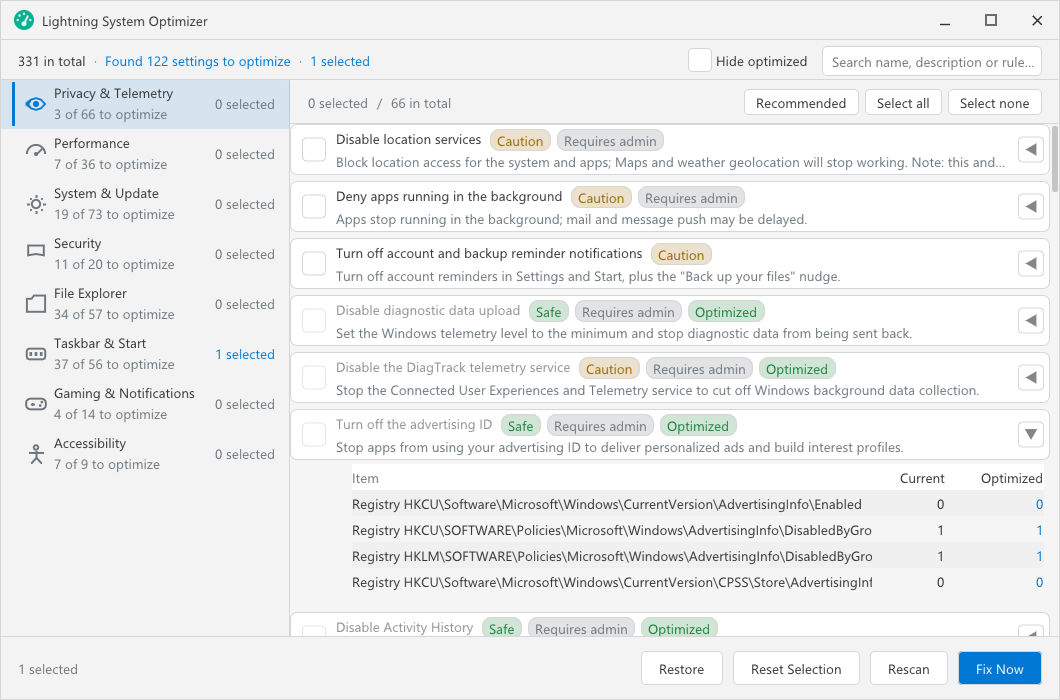
Every rule carries a Safe or Caution badge and declares up front whether it needs admin rights or a reboot; the detail view shows the registry key with its current value next to the optimized one, so "what exactly will this change?" is answered before you tick the box.
The rule model
Each tweak is a rule with one of five operation types:
reg— write a registry valuekeydel— delete a registry keysvc— change a Windows servicetask— change a scheduled taskcmd— run a command
The categories map to how people actually want to tune a machine: 73 system rules, 66 privacy, 57 Explorer, 56 shell (this is where right-click-menu cleanup lives — those CLSID entries that accumulate from every app you've ever installed), 36 performance, 20 security, 14 gaming, 9 accessibility.
A health check scans all 331 and reports which ones are not in the "optimized" state. You fix what you want, individually or in bulk. Nothing runs on a schedule behind your back.
Snapshots, not memories
Here's the part worth stealing for your own tool, whatever it edits.
Before applying a fix, the optimizer reads the current value and writes it to a local backup folder (%LOCALAPPDATA%\yyzTools\Backup\). Rollback restores from that snapshot. The critical detail: if the original value cannot be read, the fix refuses to run. A rule that can't snapshot can't apply. That one check eliminates the entire class of "I changed something and now I can't remember what" failures, because you literally cannot make an unrecorded change.
The nastiest operation type is keydel — deleting a registry key. Deleting is the one operation that can't be reconstructed from a single value, so it's doubly constrained:
It's only allowed on shell-extension keys (the context-menu handlers — a bounded, well-understood namespace).
Before deleting anything, the whole key is dumped to the backup as a snapshot, so rollback re-creates it rather than guessing at it.
There are three protection lists — generated at build time and enforced again at run time — that mark keys which are off-limits no matter what a rule says. And because some rules genuinely need elevation (service changes, HKLM writes), the tool re-launches itself with UAC only for the operations that require it, instead of running elevated from the start.
The rollback flow
The whole lifecycle:

In practice, rollback gets used exactly once per user — usually right after they discover that disabling every animation and service made Windows feel like a spreadsheet instead of making it faster. That's fine. An optimizer people can experiment with is more useful than an optimizer people are afraid of.
The uncomfortable economics of tweaks
One honest note, because the "PC optimizer" category has earned its skepticism: most tweaks don't make a modern machine measurably faster. A registry tweak that trims a menu animation saves milliseconds. The real value of a tweaks tool is closer to configuration — turning off telemetry you didn't consent to, removing context-menu entries from apps you uninstalled years ago, stopping OEM services you'll never use. That's why the health check reports state, not "score". There's no optimization percentage, no big green number that goes up. You see the list, you decide, every change is snapshotted.
That's the product stance in one sentence: a tweaks tool shouldn't promise speed; it should promise that nothing it does is a one-way door.
The System Optimizer ships in yyzTools 1.0.8 alongside a Lightning File Scan & Clean, a Lightning Disk Space Analyzer, and a Lightning Memory Cleaner — free, 12 languages, everything local. If you've written tooling that edits system state, I'd genuinely like to hear what your rollback story looks like; the comment section is open.
About the author
- I'm an indie developer building yyzTools — a Windows productivity suite with a command palette, OCR, translation, clipboard history and more. Most of my time goes into C++, Win32 and WebView2, and I write about the lessons learned from shipping desktop software solo.
Comments
Join the discussionNo comments yet. Be the first to comment.